Since I have been using Trilium not only for managing and writing blog posts (post coming soon) that you are reading now. I wanted to add a page to my site that would list the various podcasts I listen to. This also gives me the added benefit of saving the podcast information in my notes, in the true sentiment of “a personal knowledge base” as Trilium puts it.
Initially I was just going to create a collection table and manually insert information. This worked but it had a lot of extra manual labor to it. I then thought
Hey! why not just put the name of the podcast in Trilium and I will have the website use a podcast API to get the details to show!
I thought I was a genius! I had the best of both worlds! The podcast in my notes and the data on the site!
There I was! The best good boy who did science and I solved my problem! I quickly ran into extra problems when it came to possibly hitting the podcast API too many times. I had caching in mind to prevent this, but it added a whole lot of overhead to the website and overall process to integrate it.
As I was implementing the API to query the podcast endpoint I am using, I started feeling like I was doing something wrong.
I then thought
Wait… why not put the podcast api in Trilium to save the data in a table collection and then just query Trilium!?
This in a sense is exactly what I am doing with the blog posts, and I felt pretty dumb considering I had already done most of the hard work by creating a custom API library to easily query my Trilium instance.
I had my plan and the whole idea was significantly easier than I initially had planned. Ultimately, I ended up with a single input that you could type the podcast name, and it will search for it.

Once you search for a podcast a pop up will appear with the name and then the description and you can choose to add it or not.
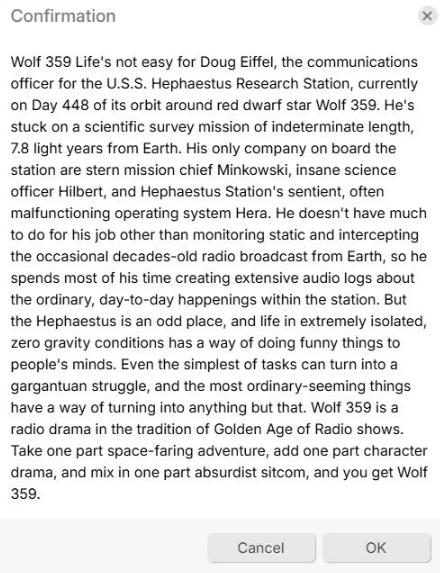
Right now, the pop up is pretty basic and just enough to know you're adding the right podcast or not. However, I hope too eventually improve it by adding in the image and making it look prettier. Right now, the Confirmation API in the Trilium frontend-api doesn't appear to support rendering HTML so I need to find a new method or possibly make a pull request to Trilium to add this. Overall, it isn't a huge deal for me since the description and image all get saved regardless.
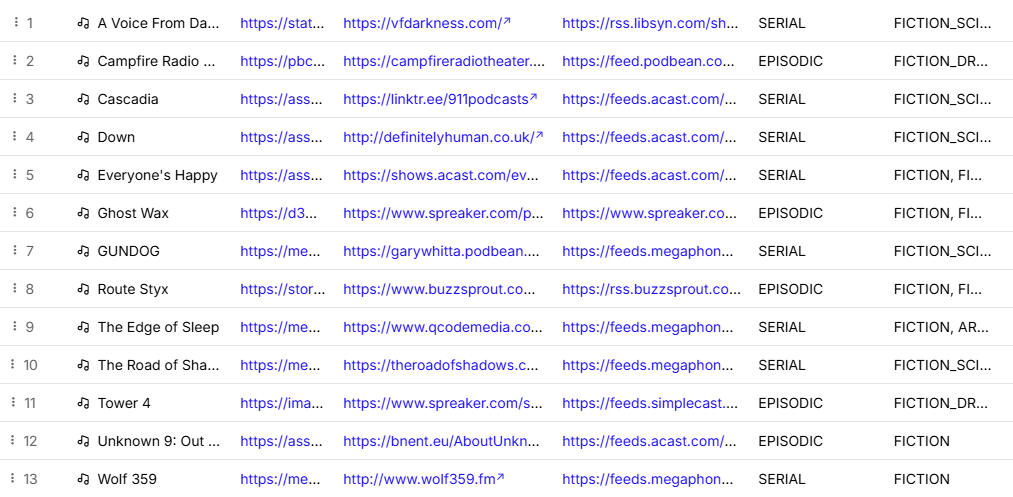
Once you click OK it saves the data in a table. You don't have to create any special columns; the script will do it automatically based on the columns you specify in the script. Again, this could probably be configurable from the front end but for the sake of a simplicity and the purpose I am using it for I don't think it is needed.
The Script Itself
To hopefully make it easier to follow I added comments in the core areas. As note I am not a fan of sticking the API keys into the script but there doesn't appear to be a straightforward way to do it otherwise. It would be cool if you could use a protected note that you could add variables similar to Github and they get injected into the scripts upon execution. That way the scripts get access, and you can use them in scripts without exposing them.
// Podcast Search Widget for Table Collections
// This widget adds a search bar to collection notes with table viewType
// must have the label #podcastSearch as well.
const TPL = `
<div class="podcast-search-bar" style="padding: 10px; border-bottom: 1px solid var(--main-border-color); background: var(--accented-background-color);">
    <div style="display: flex; gap: 10px; align-items: center;">
        <input
            type="text"
            class="podcast-title-input form-control"
            placeholder="Enter podcast title to search..."
            style="flex: 1;"
        />
        <button class="search-podcast-btn btn btn-primary" type="button">
            <span class="bx bx-search"></span> Search Taddy
        </button>
        <span class="search-status" style="margin-left: 10px;"></span>
    </div>
</div>`;

class PodcastSearchWidget extends api.NoteContextAwareWidget {
    constructor() {
        super();
        this.contentSized();
    }

    get position() {
        return 10;
    }

    get parentWidget() {
        return 'note-detail-pane';
    }

    isEnabled() {
        if (!this.note) {
            return false;
        }

        const viewType = this.note.getLabelValue('viewType');
        const hasLabel = this.note.hasLabel('podcastSearch');

        return viewType === 'table' && hasLabel;
    }

    doRender() {
        this.$widget = $(TPL);

        this.$input = this.$widget.find('.podcast-title-input');
        this.$searchBtn = this.$widget.find('.search-podcast-btn');
        this.$status = this.$widget.find('.search-status');

        // Bind event handlers
        this.$searchBtn.on('click', () => this.searchPodcast());
        this.$input.on('keypress', (e) => {
            if (e.which === 13) {
                this.searchPodcast();
            }
        });
    }

    async refreshWithNote(note) {
        if (this.$input) {
            this.$input.val('');
            this.$status.text('');
        }
    }

    async searchPodcast() {
        const podcastTitle = this.$input.val().trim();

        if (!podcastTitle) {
            api.showMessage('Please enter a podcast title');
            return;
        }

        this.$searchBtn.prop('disabled', true);
        this.$status.text('Searching...').css('color', 'var(--muted-text-color)');

        try {
        /
            const graphqlQuery = {
                query: `
                    query {
                        getPodcastSeries(name: "${podcastTitle}") {
                            uuid
                            name
                            description
                            imageUrl
                            genres
                            seriesType
                            websiteUrl
                            totalEpisodesCount
                            rssUrl
                        }
                    }
                `
            };

            // Make the GraphQL endpoint request
            const response = await fetch('https://api.taddy.org/graphql', {
                method: 'POST',
                headers: {
                    'Content-Type': 'application/json',
                    'X-API-KEY': "##########################",
                    'X-USER-ID': "#####"
                },
                body: JSON.stringify(graphqlQuery)
            });

            if (!response.ok) {
                throw new Error(`HTTP error! status: ${response.status}`);
            }

            const result = await response.json();

            if (result.errors) {
                throw new Error(result.errors[0].message);
            }

            const podcastData = result.data.getPodcastSeries;

            if (!podcastData) {
                this.$status.text('No podcast found').css('color', 'orange');
                console.log('No podcast found for:', podcastTitle);
                return;
            }

            console.log('Podcast data received:', podcastData);

            // Show confirmation dialog with podcast details
            const confirmMessage = `${podcastData.name}\n\n${podcastData.description || 'No description available.'}`;

            const confirmed = await api.showConfirmDialog(confirmMessage);

            if (!confirmed) {
                this.$status.text('Cancelled').css('color', 'var(--muted-text-color)');
                return;
            }

            // Create the podcast note with labels
            const created = await this.createPodcastNote(podcastData);

            if (created) {
                this.$status.text('✓ Podcast added!').css('color', 'green');
                this.$input.val('');
            } else {
                this.$status.text('⚠ Podcast already exists').css('color', 'orange');
            }

        } catch (error) {
            console.error('Error searching podcast:', error);
            this.$status.text(`Error: ${error.message}`).css('color', 'red');
            api.showError(`Failed to search podcast: ${error.message}`);
        } finally {
            this.$searchBtn.prop('disabled', false);
        }
    }

    async createPodcastNote(podcastData) {
        // Use runOnBackend to create note and set labels (NOT async)
        const result = await api.runOnBackend((podcastData, parentNoteId) => {
            const parentNote = api.getNote(parentNoteId);

            // Check if podcast already exists by checking child notes with same title
            const existingChild = parentNote.getChildNotes().find(child => child.title === podcastData.name);

            if (existingChild) {
                return { created: false, noteId: existingChild.noteId };
            }

            // Create the child note with podcast name as title
            const {note} = api.createTextNote(
            /
                parentNoteId,
                podcastData.name,  // Title is the podcast name
                podcastData.description || 'No description available.'
            );

            // Column mapping with transform functions - works here since it's part of the function code
            const columnMapping = [
                { columnName: 'ImageUrl', apiField: 'imageUrl', type: 'url' },
                { columnName: 'Website', apiField: 'websiteUrl', type: 'url' },
                { columnName: 'RssUrl', apiField: 'rssUrl', type: 'url' },
                { columnName: 'SeriesType', apiField: 'seriesType', type: 'text' },
                {
                    columnName: 'Genres',
                    apiField: 'genres',
                    type: 'text',
                    transform: (value) => {
                        if (Array.isArray(value)) {
                            return value
                                .map(g => g.replace(/^PODCASTSERIES_/, ''))
                                .join(', ');
                        }
                        return value;
                    }
                }
            ];

            // change the icon
            note.setLabel("iconClass", "bx bx-music");

            // Set labels on the child note using column names
            columnMapping.forEach(mapping => {
                let value = podcastData[mapping.apiField];

                // Apply transform if it exists
                if (mapping.transform && value !== undefined && value !== null) {
                    value = mapping.transform(value);
                }

                if (value) {
                    note.setLabel(mapping.columnName, String(value));
                }
            });

            // Add inheritable and promoted labels to the PARENT (collection) note
            // Only do this once - check if any of the label definitions already exist
            const labelDefinitionExists = parentNote.getOwnedLabels().some(label =>
                label.name.startsWith('label:') &&
                columnMapping.some(m => label.name === 'label:' + m.columnName)
            );

            if (!labelDefinitionExists) {
                columnMapping.forEach(mapping => {
                    // Use addLabel with isInheritable = true to create the label definition
                    // Format: #label:columnName(inheritable)=promoted,single,type
                    parentNote.addLabel(
                        "label:" + mapping.columnName,
                        `promoted,single,${mapping.type}`,
                        true
                    );
                });
            }

            return { created: true, noteId: note.noteId };

        }, [podcastData, this.note.noteId]);

        return result.created;
    }
}

module.exports = new PodcastSearchWidget();
Installing
To install the script into your Trilium instance create a new note (it doesn't really matter where) set the type to js-frontend and add a #widget label to it. This will ensure the system sees it as a widget and will apply it.
Copy the script above into the note and go to the Taddy API and sign up. You get 500 free requests a month which I have found to be more than enough for myself. Once you get the API key and user id from your dashboard you will need to place them into the script where I put the #### placeholders.
Create a new note and set the type to Collection then set the view type to Table open the attributes and add the label #podcastSearch. Finally, refresh the page and the input should be at the top of your table. If the style looks a little weird to you, this is kind of expected at this point and according to my discussion on the projects GitHub this will be better in a future version.
You will then be able to type the name of a podcast in the input click enter or the search button and it will ask if you want to add it to your table!
Possible better API
I initially tried using the PodcastIndex.org API but ran into an issue when attempting to use the keys in the script. The podcast index requires using authentication crypto to create a SHA-1 hash of the keys plus the time to pass to the API endpoints. I couldn't find an easy way to accomplish this and considering Taddy supported my needs I figured I wouldn't spend as much time digging into the scripting API for Trilium to find if it was possible or not.
How it is used here
If you visit the podcasts page on my site all the podcasts currently added using this widget in Trilium will be visible on the site. Making it a lot easier to quickly and easily add new ones into my list.
I plan to make a post regarding the method I am using to query and the library I created but I am wanting to ensure it is in a good state before releasing it.
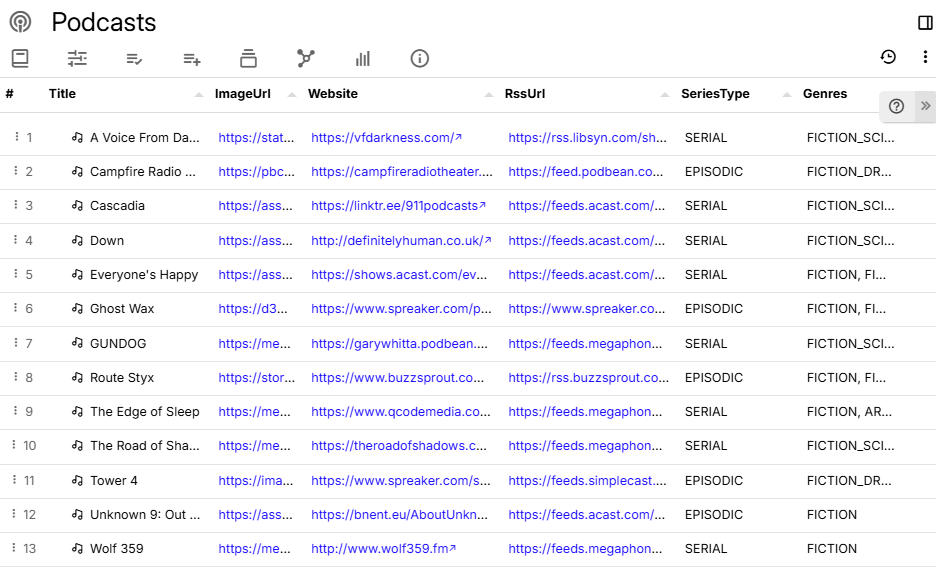
Go give Trilium some love!
1/21/2026 - Update
A small update, I also managed to use a similar method for the list of books page.